
You can now claim your business in ChatGPT through Business Hub, verify it, and manage the profile people see when they click your name. This lets you control what that profile says and see how often ChatGPT cites your website. It is free, and we recently claimed our own, so this guide covers each step.
What does it mean to claim your business in ChatGPT?
Claiming means proving to OpenAI that you run the business, so you can manage its profile in Business Hub. According to OpenAI's launch announcement, the feature, Businesses in ChatGPT, went into beta on 10 November 2026. Once verified, you can edit your details, add a product feed with prices and stock, and see mentions, website clicks and discovery topics.
OpenAI puts the audience at 1.2 billion people using ChatGPT each week. According to OpenAI, when a business appears in an answer, people can click to see its ChatGPT profile.
The closest comparison is a Google Business Profile. Your listing may already exist, and claiming it is how you supply what it says.
Three limits are worth knowing before you start:
- Who can claim: according to OpenAI's setup guide, you must own the business or be authorized to represent it. You don't need an Ads account or a ChatGPT Enterprise plan.
- Local businesses: stores and restaurants can currently claim only an existing US listing. Online businesses can add a new profile.
- Visibility: OpenAI says claiming doesn't guarantee more visibility, and advertising doesn't influence ChatGPT's own answers.
How to claim your business in ChatGPT, step by step
The process has two checks, then setup. First you prove your connection to the business, then you prove who you are through Persona, OpenAI's identity verification provider. Only after both are approved can you edit the profile, see insights or add a product feed.
Step 1: Find your business in Business Hub
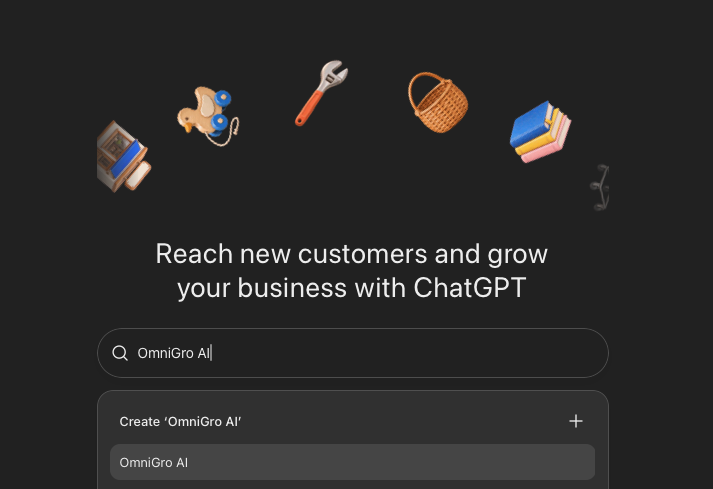
Sign in to ChatGPT and go to chatgpt.com/business-hub. Search for your business by name and pick the matching listing. If you run an online business and nothing comes up, you may see an option to add it.
Step 2: Verify your connection to the business
Choose one of the verification methods shown for your listing. They vary by listing, so you may not see all four:
- Business phone: a code by text or automated call to the listed number.
- Business email: a code sent to the email linked to the business.
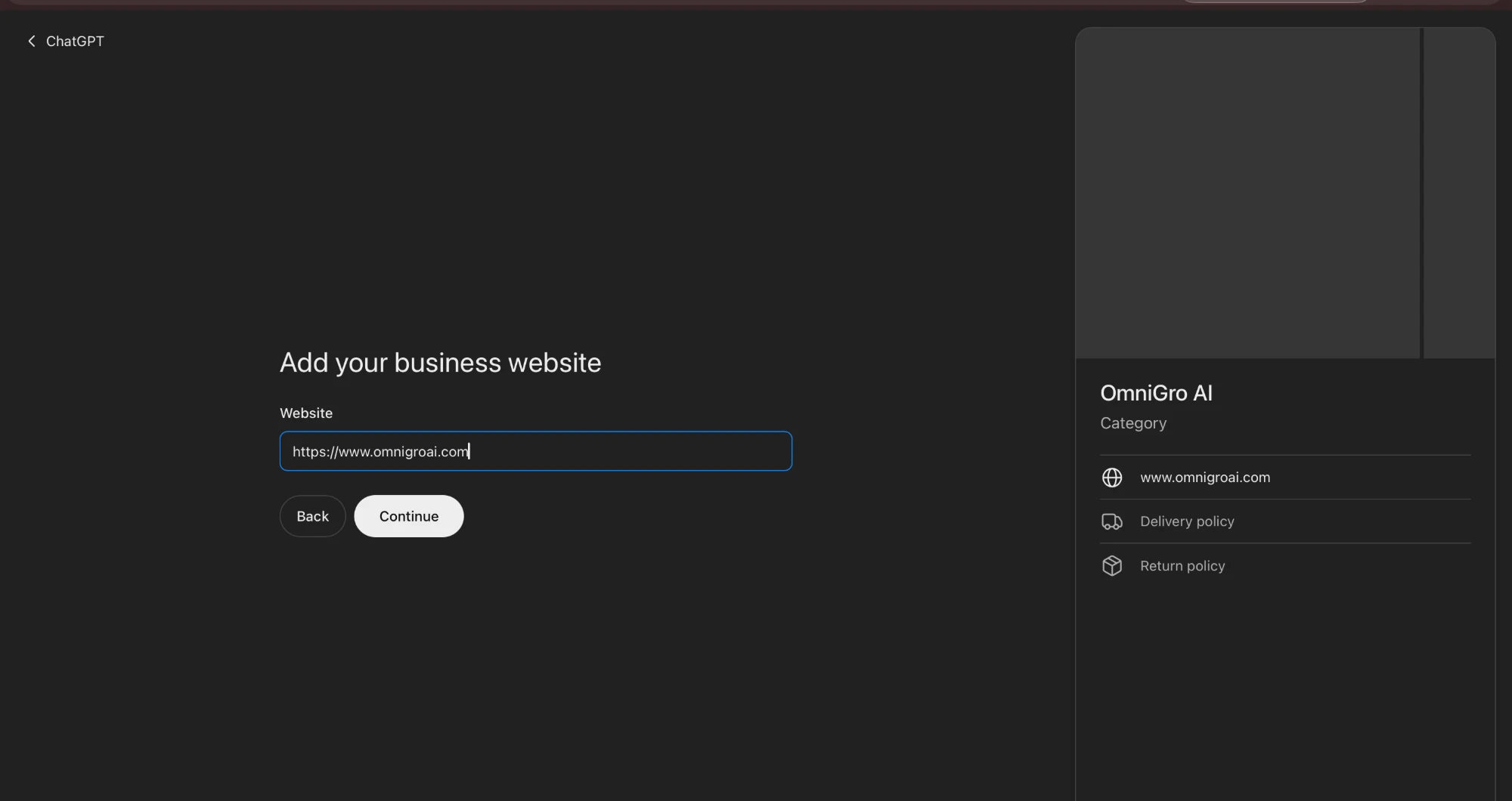
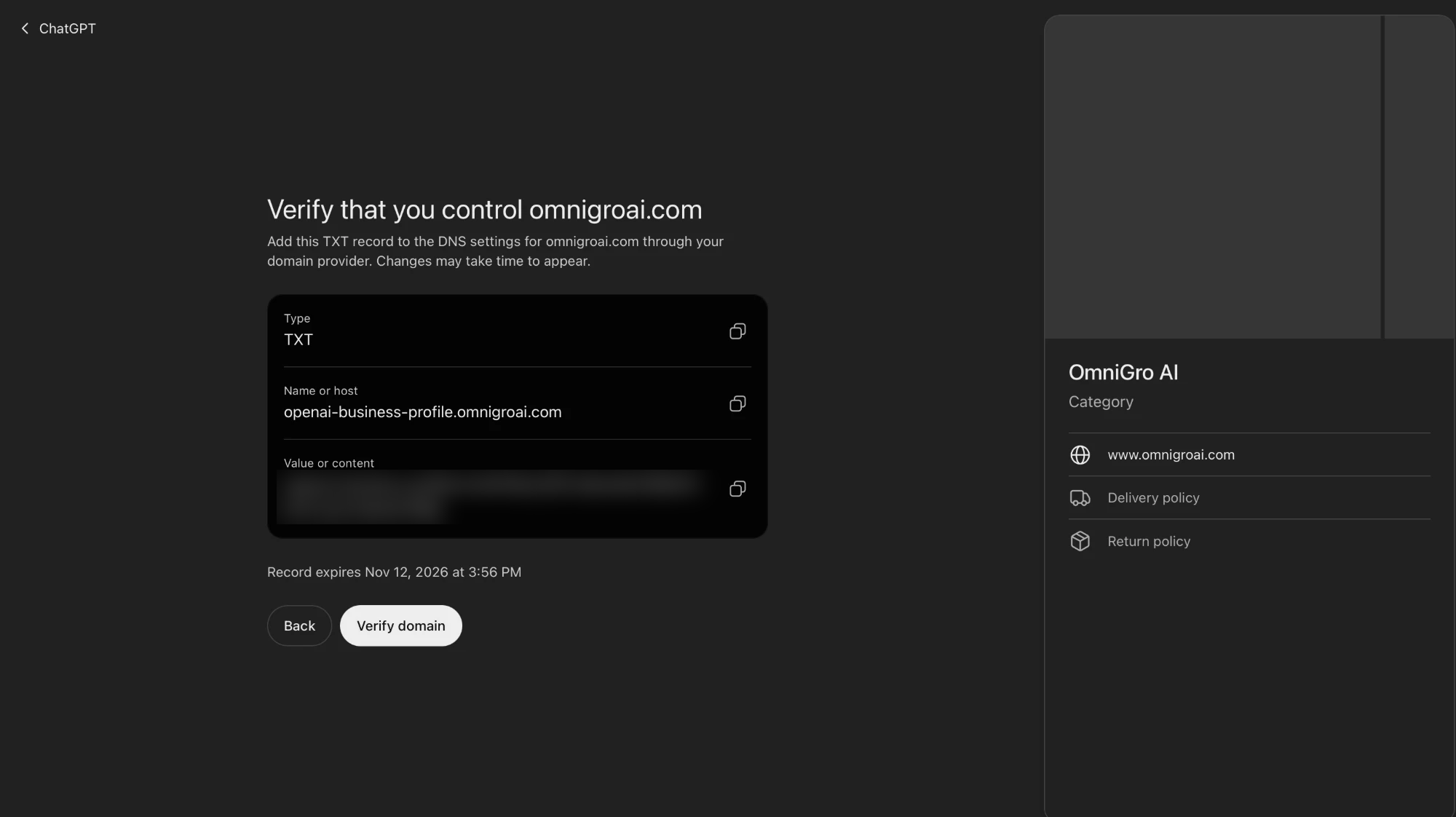
- Website domain: add the TXT record ChatGPT shows you to your domain's DNS settings, then click Verify domain.
- Shopify: connect your store.
If someone else manages your domain, send them the record's type, host and value exactly as shown. The record has an expiry time, so add it and click Verify domain before it lapses. DNS changes can take time to appear. OpenAI then reviews the claim and emails its decision.
Step 3: Verify your identity with Persona
The Persona check is a separate step, and the blue verified badge appears only after it is approved. Persona may ask for a government ID, business registration details and proof that you can represent the business.
We used a Singapore-issued ID. Persona asked for a live photo of the front and back, so have the physical card on hand. Submitting it took one to two minutes.
Then you wait for approval. Until Persona approves you, Business Hub won't let you fill in the profile, see insights or add a product feed. Ours took about an hour, but plan for up to a day.
Use the legal name from your registration documents, and put your trading name in the "doing business as" field. The address and any registration number must match your official records, or the check can fail.
It feels like verifying a Meta Business or Google Ads account: prove the business is yours, then prove who you are.
Step 4: Write your description and fill in the profile
Click Edit business info to set your website, category, description, logo, cover photo, and delivery and return policies. The description field has a 300-character limit, so write it as a positioning line: what you do, for whom, and one proof point.
Ours runs to 298 characters:
> OmniGro AI helps brands grow through AI search (GEO). It gets consumer brands and service businesses cited by ChatGPT and other AI engines. It finds and fixes what stops AI from understanding and recommending a business. One client went from missing on 11 of 15 AI queries to recommended on all 15.
The proof point comes from our Three Squared Nine case study. Use the same description on your homepage, LinkedIn and Google Business Profile. When sources describe a business differently, AI engines can repeat the wrong version, as we explain in why AI gives wrong information about your business.
OpenAI reviews every change before it goes live, and ChatGPT may still use other sources when it answers questions about you.
Step 5: Read your insights
Insights show mentions, website clicks and discovery topics. On our account, Brand insights could be set to the last 7 or 28 days. Each metric counts something specific:
- Mentions: for an online business, a mention counts only when ChatGPT references your website. Your brand name alone doesn't count.
- Website clicks: how often people click through to your site.
- Discovery topics: common themes in answers that mentioned or cited you. They don't show individual prompts.
Some metrics may show no number at first. According to OpenAI's setup guide, that happens when activity is below the reporting threshold or data is still being collected.
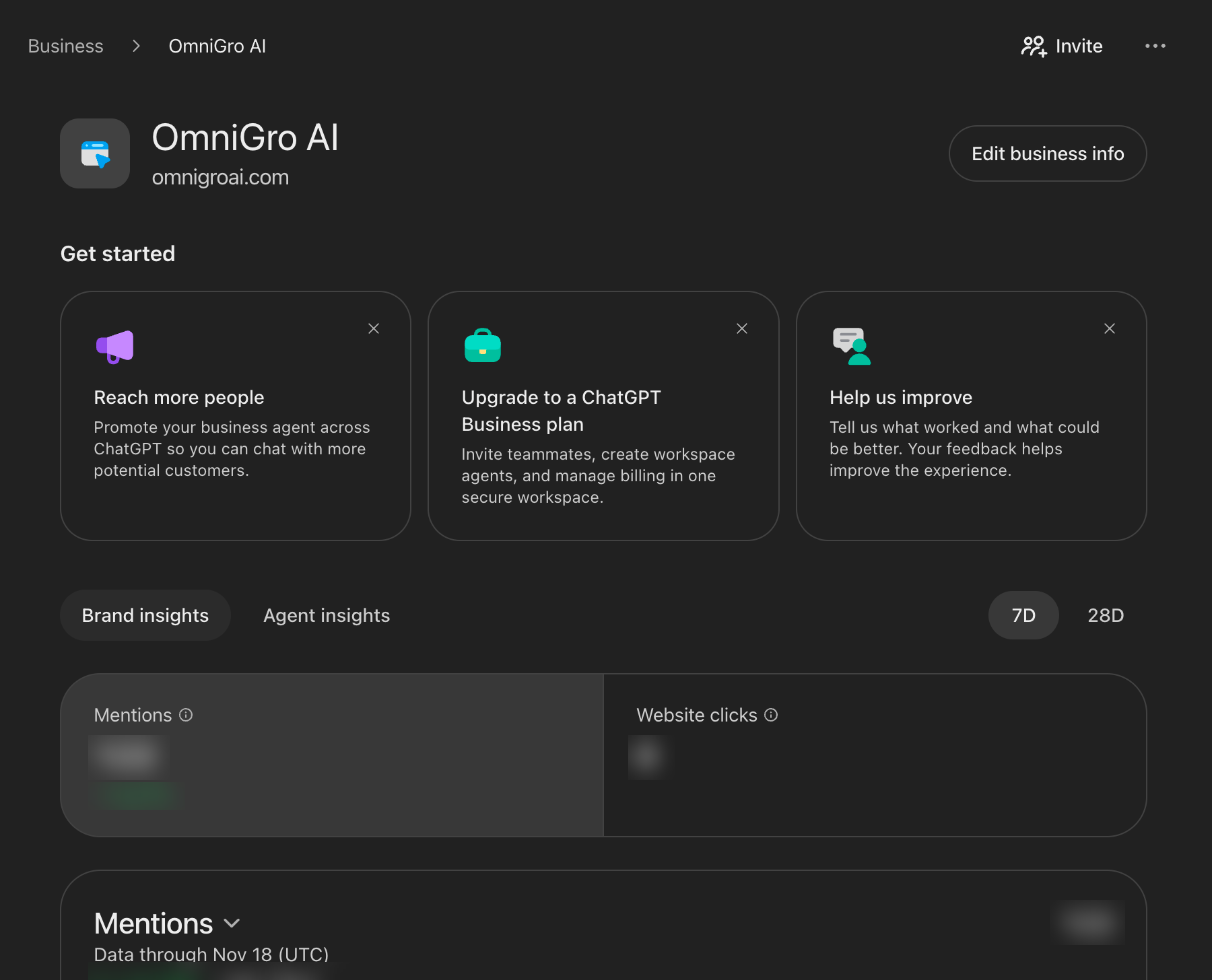
On our first reading, discovery topics were still empty. For how these numbers compare with other ways of counting citations, see how to track AI citations.
Step 6: Add a product feed if you sell products
Ecommerce brands can connect a product feed to share current prices and stock. You can upload a CSV that follows OpenAI's product feed specification, link to a hosted feed file, or connect Shopify. We skipped this step because we sell a service. OpenAI notes that a feed doesn't guarantee ChatGPT recommends your products.
Step 7: Invite your team or agency
Click Invite on the Business Hub overview to open "Invite business admins". The person's email must already belong to a ChatGPT account. When we tried an email with no account, the invite failed with "Unable to invite. Use the email of a valid ChatGPT account."
So ask your teammate or agency to sign up for ChatGPT with their work email first, then invite that email. Each person uses their own account, the same way an agency gets access to a Google Business Profile without sharing a login.
What discovery topics show about your business
Discovery topics show the subjects ChatGPT was answering when it cited your website. Ours were empty on our first reading and have since filled in.
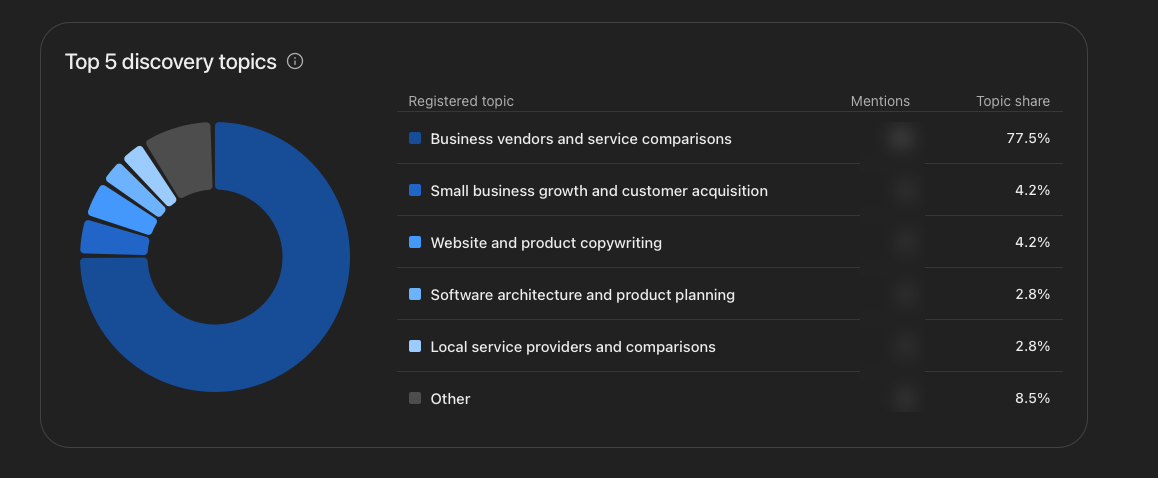
At the time of writing, "Business vendors and service comparisons" made up 77.5% of our cited answers. So ChatGPT cites us mostly when people compare vendors and services.
The smaller topics are useful too. "Small business growth and customer acquisition" and "Website and product copywriting" each had 4.2%. "Software architecture and product planning" had 2.8%, though we don't sell that. A topic like this shows where ChatGPT cites you for things you never planned to be known for.
What customers see when ChatGPT names your business
Customers reach your profile through ChatGPT's answers, since there is no business directory to browse. We tested this by asking ChatGPT "Tell me about OmniGro AI (omnigroai.com). What do they do?". "OmniGro AI" was underlined, and clicking it opened a panel with our name, the blue verified badge and an overview.
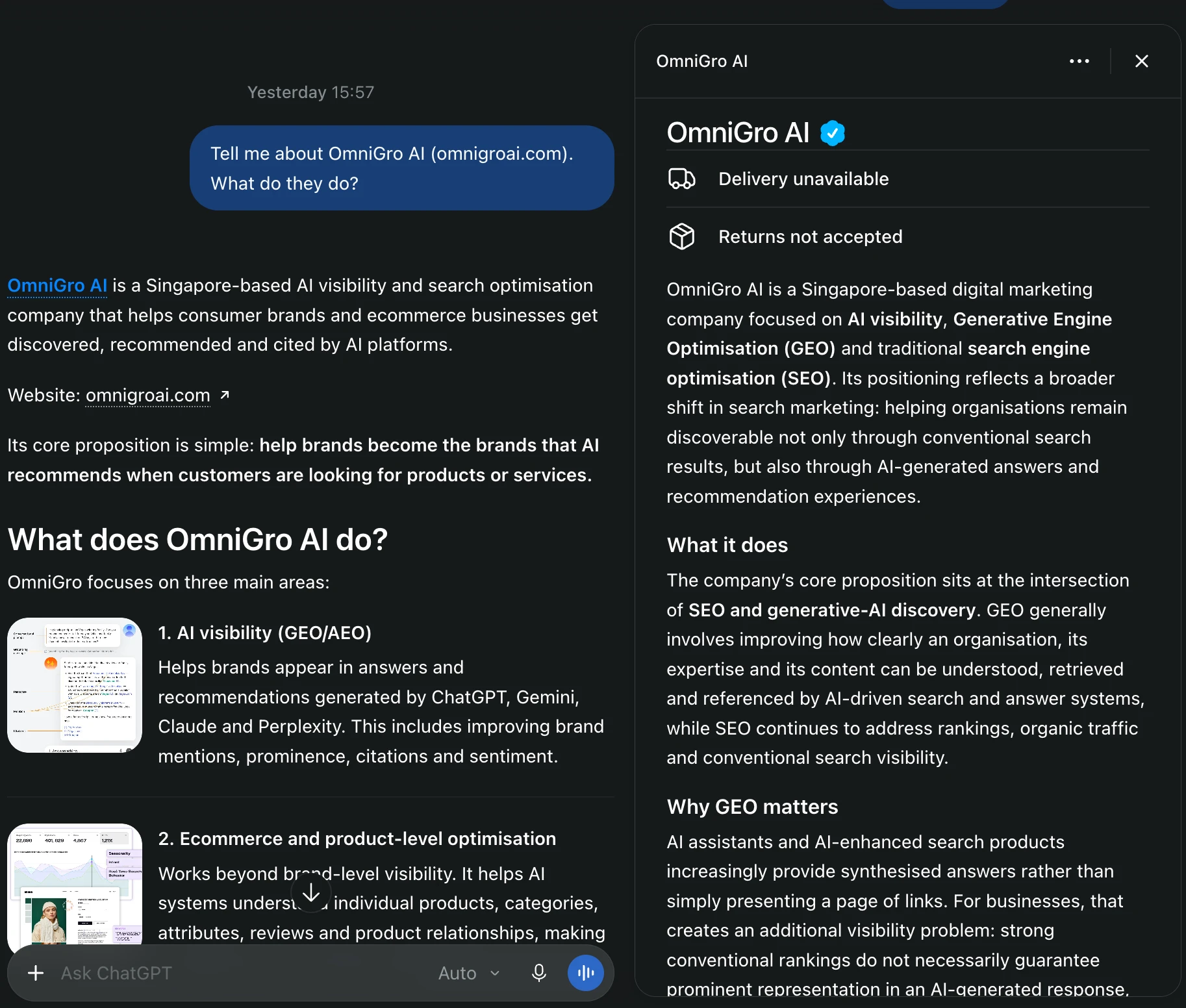
The overview was written by ChatGPT, and our 300-character description may still be in OpenAI's review. Fill in every field, including your logo and cover photo, so the panel shows details you chose.
What about Business Agents?
Business Agents are an optional chat that customers can open from your profile to ask follow-up questions. According to OpenAI's setup guide, they are available to eligible ecommerce and online service businesses in the US with a website. Your business must also meet OpenAI's Business Agents Policy. A verified profile alone doesn't make you eligible.
The agent can explain your products and policies and link to your website. It can't complete purchases, make bookings or check orders. OpenAI says businesses don't receive the chats customers have with their agent.
According to its launch announcement, OpenAI plans to bring Business Agents to more markets and business categories over time. We're watching for that and will update this guide when agents open up more widely. Until then, start with the profile, which every eligible business can use now.
Claiming a ChatGPT profile vs a Google Business Profile
The two work in similar ways. The biggest difference is what claiming does for visibility. This comparison is based on OpenAI's setup guide and our own setup.
| ChatGPT Business Hub | Google Business Profile | |
|---|---|---|
| Cost to claim | Free | Free |
| Where it shows | When ChatGPT names you and someone clicks | Google Search and Maps |
| Effect of claiming on visibility | Doesn't guarantee more visibility, according to OpenAI | Verified, complete profiles are more likely to show up in local results, according to Google |
| Status | Beta, launched 10 November 2026 | Established |
Claiming a ChatGPT profile won't guarantee a recommendation. It does let you shape what ChatGPT shows about your business. A clear description of who you are, kept the same across every source, is a core part of GEO (generative engine optimization). This profile is now one of those sources.
FAQs
Is it free to claim your business in ChatGPT?
Yes. Claiming your business is free, and you don't need an Ads account or a ChatGPT Enterprise plan. OpenAI treats claiming, advertising and Business Agents as separate. You can manage your profile and see insights without running ads or publishing an agent.
How long does verification take?
Review times vary, according to OpenAI. Our Persona ID check was approved about an hour after we submitted it. Plan for up to a day, or longer if OpenAI asks for more information. Make sure your legal name, address and registration number match your records.
Will claiming my business make ChatGPT recommend it more?
Not necessarily. OpenAI says claiming doesn't guarantee more visibility, and ads don't influence ChatGPT's independent answers. What you get is an accurate profile, a verified badge and OpenAI's own data on how often ChatGPT cites your website.
Can an agency manage my ChatGPT business profile?
Yes. The admin who claimed the business can invite teammates or an agency from Business Hub. Each person needs their own ChatGPT account, and the invite only works with an email that already has one.
Can businesses outside the US claim a profile?
Online businesses can, where ChatGPT is available: we're a Singapore company, and our profile was approved. Local stores and restaurants can only claim an existing US listing for now, and OpenAI lists Business Agents for eligible US businesses only.
Where to start
Open Business Hub, search for your business, and complete both checks this week. Then fill in every field so ChatGPT stops guessing your cover image and policies.
The profile only appears once ChatGPT names you. Our free AI Visibility Assessment shows where ChatGPT and Gemini name your brand today, and where they miss it. We can also set up your profile with your admin and track the insights monthly. We're excited to set this up for our clients and use what it shows to get them named in more ChatGPT answers. Book your free assessment.